

Private Jet Scene Props: Dressing a Luxury Cabin and VIP Arrival
October 30, 2026
Airline Safety Demonstration Props: Staging the Pre-Flight Demo for Film
November 6, 2026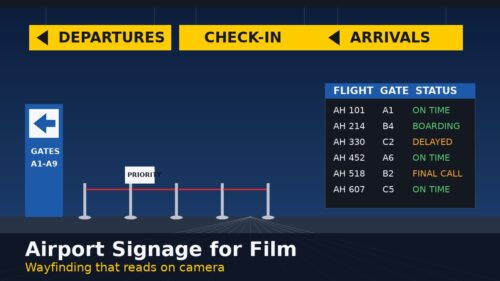
Signage does more work in an airport scene than almost any other prop. Before a single line of dialogue, a hanging “Departures” sign or a wall of flight information monitors tells the audience exactly where they are and what is about to happen. This guide is for production designers, set decorators, art directors, prop masters and producers who need airport signage that reads clearly on camera. It covers how to plan wayfinding for the shot, which sign types do which job, and how to handle graphics and screen content without slowing down the day.
Why airport signage matters on camera
Real airports are built around wayfinding. Passengers move from curb to check-in, through security, to the gate and on to baggage claim, and signs guide every step. Audiences have absorbed that visual language, so they recognize an airport from its signs long before they notice the architecture. On set, that means signage can carry a lot of the location for you:
- It establishes place fast. One overhead “Arrivals” or “Check-In” sign in a wide shot does the job of an establishing exterior.
- It tells the story beat. A flight information display can show a delay, a cancellation or a final boarding call without anyone saying it.
- It directs your background. Extras move more naturally when the set gives them a logical flow to follow.
Plan signage from the shot list
Start with what the camera will actually see, not with a list of everything an airport contains. Walk through each setup and ask three questions: where is the character, where are they going, and what does the audience need to read?
Follow the passenger journey
Map the scene to a stage of the journey and dress for that stage. A check-in scene wants overhead “Check-In” signs, queue signs on stanchions and a carry-on sizer near the counter. A security scene wants “TSA PreCheck” and lane signs. A gate scene wants gate numbers, boarding group signs and a flight display. Baggage claim and arrivals want “Arrivals” overheads, directional signs and lightbox advertising. Our guides to check-in counter set dressing, airport gate set dressing and baggage claim and arrivals set dressing cover each area in more detail.
Think in three layers
Most convincing terminal frames have signage at three heights. High: hanging or mounted signs that name the zone. Middle: freestanding directional walls, totems and digital kiosks at eye level. Low: stanchion toppers, counter signs and small loose signs.
Sign types and what each one does
Hanging and mounted zone signs
Overhead signs are the fastest way to say “airport.” Our hanging and mounted airport signs are a matching five-sign set reading “Terminal,” “Check-In,” “All Gates,” “Arrivals” and “Departures.” They are double sided, top hanging and lightweight, so they read from both directions. The “Departures” sign and “Arrivals” sign are 5 ft wide x 15 in high, and the other three are 4 ft wide x 12 in high. Hang them in the top third of a wide shot so they frame the action without competing with faces.
Directional walls and totems
For eye-level wayfinding and set depth, freestanding pieces are hard to beat. The 7 ft and 9 ft blue directional walls are on wheels, light enough for one person to move, and blank on the back for custom vinyl, which makes them useful for a fictional airport. The 8 ft directional totem is 30 in wide, rolls on wheels and takes interchangeable signage in two panels. Place them at the edges of frame or as foreground pieces to break up a long, empty wall.
Freestanding frame signs
Frame signs fill the middle ground at check-in, gates and security. The large freestanding metal frame signs come in black, chrome and rod styles, with 28 x 22 in artwork that is interchangeable and mostly double sided PVC. Smaller metal, black and post-style frames, banner-style signs and luggage sizers round out a queue area. Browse the full range of freestanding airport signs to match frame finishes across a set.
Stanchion toppers and queue signs
Queues are where small signs earn their keep. Stanchion sign frames fit our 36 in stanchions and hold the “Priority,” “Groups” or lane messaging that tells extras where to stand. The 6 ft post stanchion sign comes with a choice of “Priority/General” or “Groups.” For security, the 8 ft TSA PreCheck sign is an instant read.
Lightboxes and advertising
Backlit advertising makes a concourse feel commercial and lived in. Our wall-mounted fabric lightboxes come in 4 ft x 6 ft and 6 ft x 4 ft sizes with travel-themed graphics.
Digital signage and flight information displays
Screens are the most story-friendly signs in an airport, because their content can change with the script. Our arrivals/departures monitor walls come in working two-monitor and four-monitor versions on wheels, with programmable displays. The 65 in digital sign kiosks, five matching in black or white, play JPEG images and looping MOV files and GIFs for flight information, directions or advertising. The 72 in freestanding digital sign has a 55 in vertical display and phone or laptop casting.
Content tips for screens
- Build content to the story. Decide the departure time, gate and status that matter for the scene, then build the rest of the board around them.
- Use fictional airlines and flight numbers. Invented names avoid clearance issues and let you control continuity.
- Prepare loops in advance. Deliver files in the formats the screen plays, at the right orientation, and test them before the shoot day.
- Plan for status changes. If a flight flips from “On Time” to “Delayed” on camera, prepare both versions and cue them like any other playback.
Graphics, branding and clearance
Real airline names, airport logos and brand advertising generally need clearance or replacement. Many productions create a fictional airline and airport identity and carry it across signs, counters, wardrobe and screens. Several of our signs are built for this. The directional walls are blank on the back for custom vinyl, the tall luggage sizer has a defined space for airline logo vinyl, and frame signs take interchangeable artwork. For freestanding frame signs, the currently available cleared art is shown in each product gallery, so you can check it against your design before booking.
Common signage mistakes to avoid
- Too many signs in one frame. Real terminals are busy, but on camera clutter fights with your actors. Pick the signs that tell the beat.
- Mismatched styles. Mixing frame finishes and fonts makes a set look assembled. Keep one design family per zone.
- Signs facing the wrong way. Double sided signs help, but check reverse angles before you lock positions.
- Screens left on default content. A blank or desktop screen in the background is an instant giveaway. Load content before camera rolls.
Airport signage checklist
- Overhead zone signs: Terminal, Check-In, All Gates, Arrivals, Departures
- Directional walls or totems for eye-level wayfinding
- Freestanding frame signs with matching artwork
- Stanchions with sign toppers for queues
- TSA PreCheck or lane signs for security scenes
- Arrivals/departures monitor wall or digital kiosks with prepared content
- Lightbox advertising for concourse depth
- Small and medium loose signs for counters, doors and staff areas
- Fictional airline graphics and vinyl, approved by the art department
FAQ: airport signage for film
Can I put my own graphics on rented airport signs?
Some pieces are designed for it. The 7 ft and 9 ft directional walls are blank on the back for custom vinyl, the tall luggage sizer has a space for airline logo vinyl, and the totem and frame signs take interchangeable artwork. Ask us about your plan when you request a quote.
Do the digital signs and monitor walls work?
Yes. The arrivals/departures monitor walls are working, programmable displays. The 65 in kiosks play JPEG images and looping MOV files and GIFs, and the 72 in sign supports phone or laptop casting.
Where can I find rental terms and pickup details?
Our aviation prop rental FAQ covers how quotes, rentals and pickup work.
Request a quote
Need a full terminal rather than a corner of one? Air Hollywood offers standing airport and aircraft sets in Los Angeles. For signage, browse our airport signage props, add the signs, screens and stanchions you need to your props bin and submit a quote request. No account is required, and our Los Angeles team aims to reply within 24 hours.